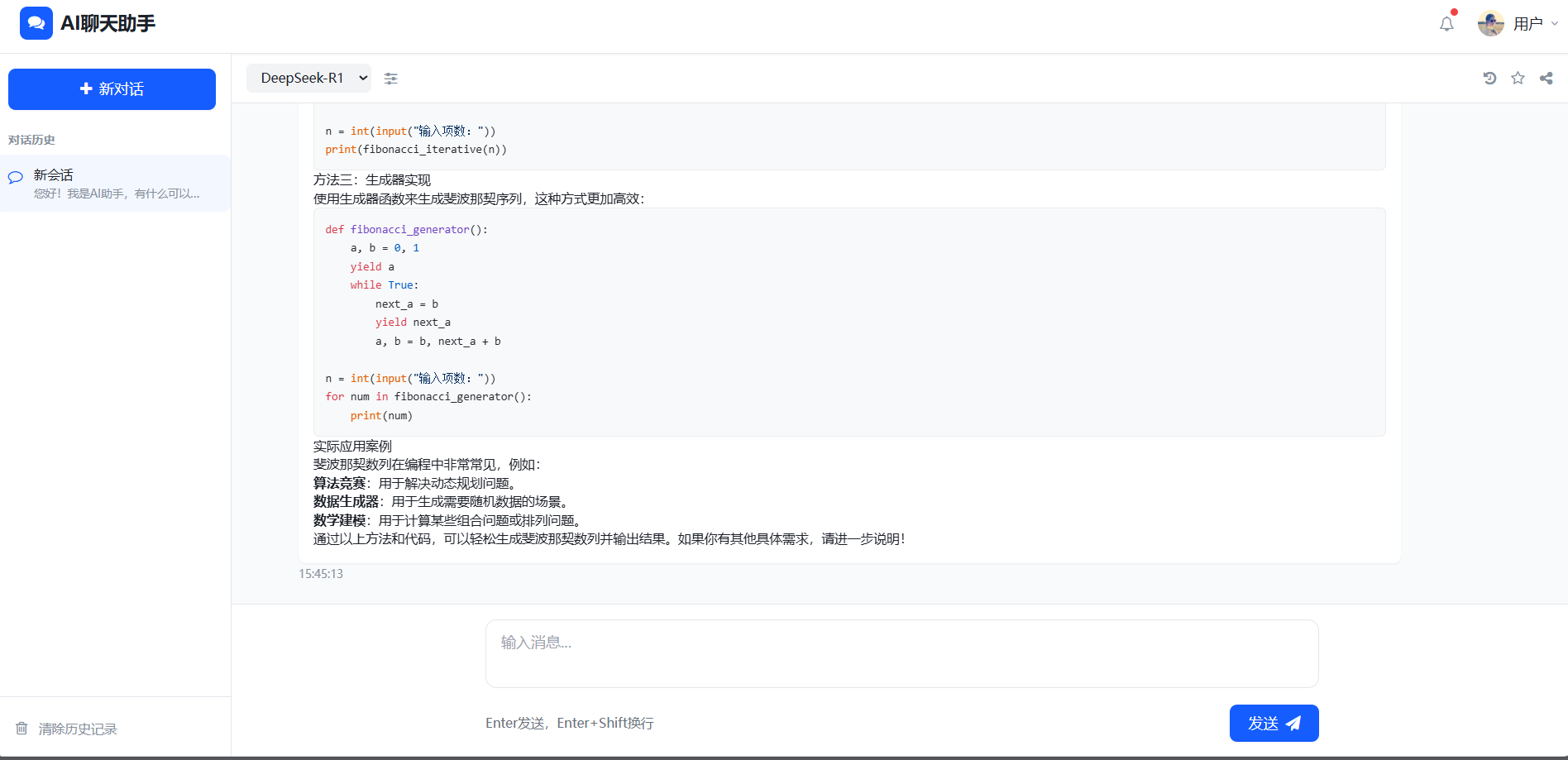
ollama本地部署DeepSeek大模型
一、Ollama 安装
- 下载准备:访问 Ollama 官网下载 Ollama 安装程序。在安装前,请确保 C 盘预留足够的存储空间,以避免安装过程中出现空间不足的问题。
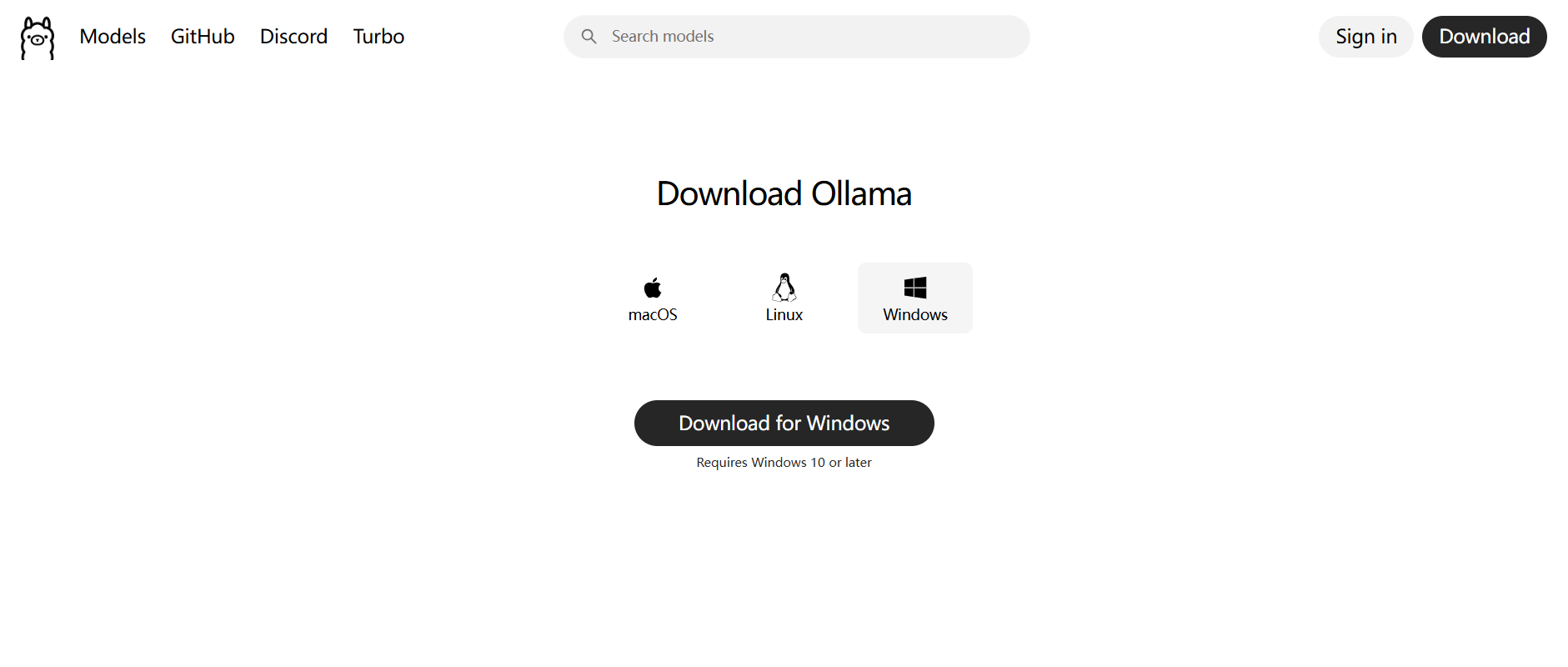
- 安装验证:安装完成后,打开命令提示符(CMD),输入
ollama指令。若能看到如下提示信息,则表示 Ollama 安装成功。
C:\Users\23014>ollama
Usage:
ollama [flags]
ollama [command]
Available Commands:
serve Start ollama
create Create a model from a Modelfile
show Show information for a model
run Run a model
stop Stop a running model
pull Pull a model from a registry
push Push a model to a registry
list List models
ps List running models
cp Copy a model
rm Remove a model
help Help about any command
Flags:
-h, --help help for ollama
-v, --version Show version information
Use "ollama [command] --help" for more information about a command.
此信息为 Ollama 命令行工具的使用帮助,展示了该工具的基本用法和可用命令。
二、Ollama 命令行工具使用说明
1. 基础格式与作用
- 格式:
ollama [flags]或ollama [command] - 作用:通过命令行与 Ollama 进行交互,可实现模型的下载、运行、管理等一系列操作。
2. 核心命令详解
| 命令 | 功能 | 说明 | 示例 |
|---|---|---|---|
serve |
启动 Ollama 服务 | 在运行模型之前,通常需要先启动该服务。服务默认在本地后台运行,支持模型的加载和交互。 | ollama serve |
create |
从 Modelfile 创建自定义模型 | Modelfile 是用于定义模型配置的文件,类似于 Dockerfile,可指定基础模型、参数、提示词模板等,用于微调或定制模型。 | ollama create my-model -f Modelfile(从当前目录的 Modelfile 创建名为 my-model 的模型) |
show |
显示模型的详细信息 | 信息包括模型的参数、大小、描述、Modelfile 内容等,有助于用户全面了解模型配置。 | ollama show llama3(查看 llama3 模型的信息) |
run |
运行一个模型并进入交互模式 | 这是最常用的命令之一,支持用户直接输入问题与模型进行对话,也可通过参数指定输入文件等。 | ollama run llama3(启动 llama3 模型并进行交互) |
stop |
停止正在运行的模型 | 该命令可释放模型占用的内存资源,使用时需指定要停止的模型名称。 | ollama stop llama3 |
pull |
从模型仓库下载模型到本地 | 默认从 Ollama 官方仓库拉取模型,也支持从第三方仓库下载,使用时需指定模型的完整名称(如 username/model:tag)。 |
ollama pull mistral(下载 mistral 模型) |
push |
将本地模型推送到远程仓库 | 在推送前,需要先登录目标仓库(如 Ollama Hub),该命令常用于分享自定义模型。 | ollama push my-username/my-model:latest |
list |
列出本地已下载的所有模型 | 会显示模型的名称、ID、大小、修改时间等信息,方便用户查看本地存储的模型情况。 | ollama list |
ps |
列出当前正在运行的模型 | 类似于进程查看命令,会显示运行中的模型名称、PID、启动时间等信息。 | ollama ps |
cp |
复制一个模型(重命名或创建副本) | 可用于备份模型或创建不同名称的相同模型。 | ollama cp llama3 my-llama3-copy(将 llama3 模型复制为 my-llama3-copy) |
rm |
删除本地模型 | 用于清理不再需要的本地模型,释放磁盘空间。 | ollama rm old-model(删除名为 old-model 的模型) |
help |
查看某个命令的详细帮助 | 当用户对某个命令的具体用法不清楚时,可使用该命令获取详细信息。 | ollama help run(查看 run 命令的具体用法) |
3. 常用参数说明
| 参数 | 功能 | 示例 |
|---|---|---|
-h, --help |
显示帮助信息 | ollama -h(查看全局帮助) |
-v, --version |
显示 Ollama 的版本号 | ollama -v |
三、DeepSeek 模型下载与部署
1. 模型选择
打开 Ollama 的 Models 界面,从中找到 DeepSeek 模型。
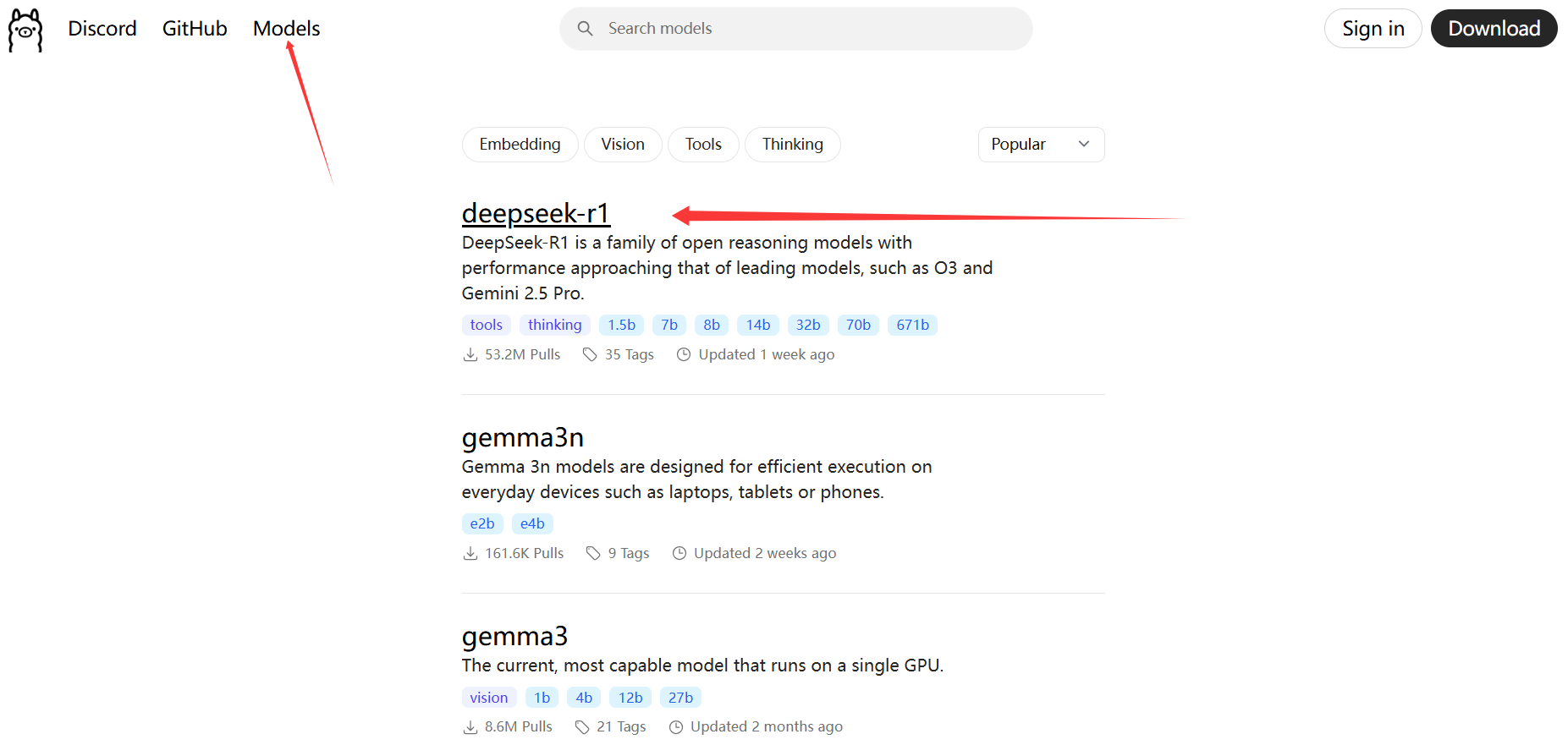
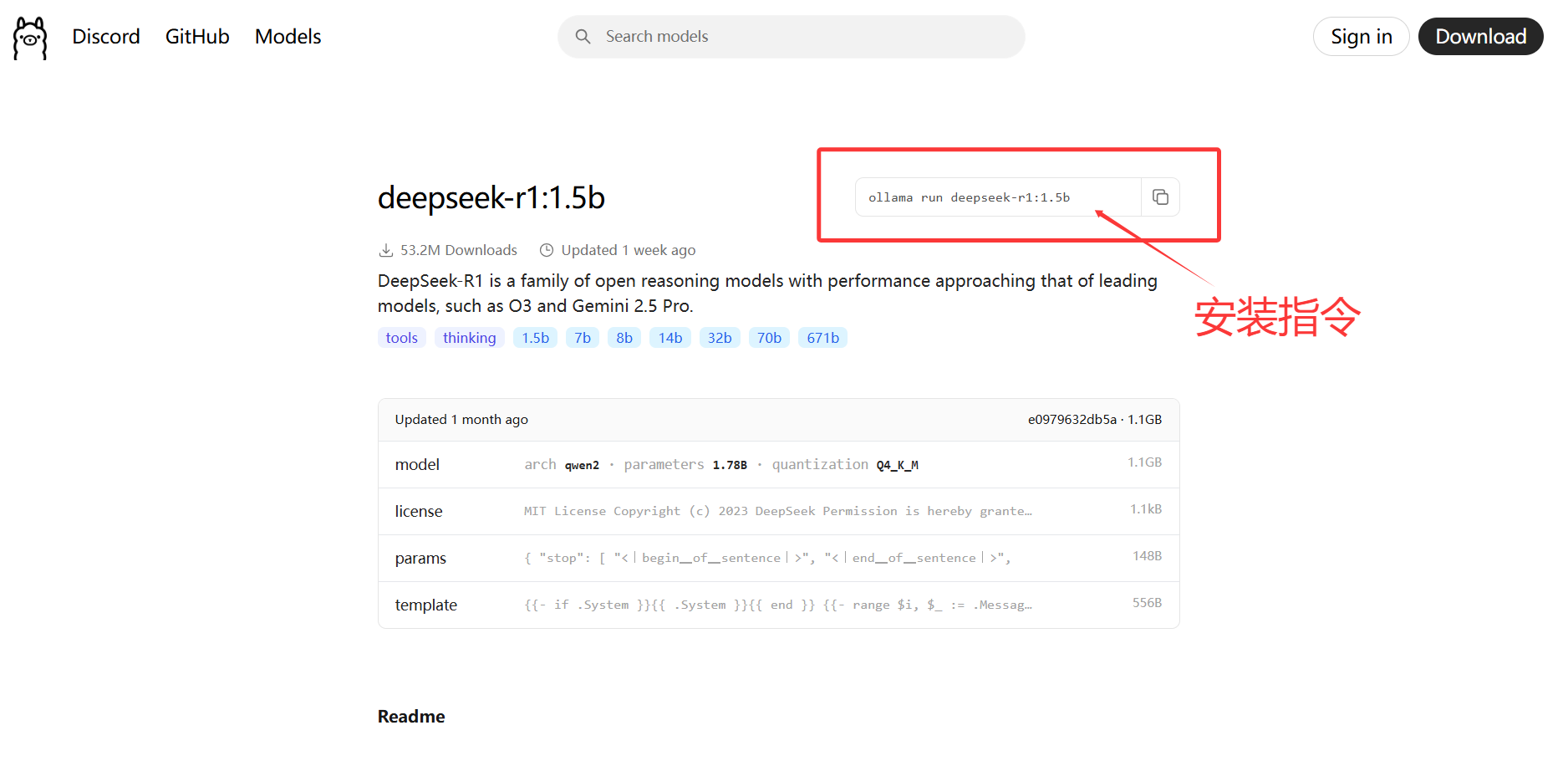
可以看到有多种版本的 DeepSeek 模型可供选择,不同版本的区别在于模型的参数规模不同。一般来说,参数规模越大,对硬件的要求(如显存、硬盘等)就越高。本文以 1.5b 版本为例进行下载和部署,该版本模型仅需 4GB 显存的 GPU,CPU 方面,最低要求为 4 核处理器,同时需要 8GB 内存和 3GB 以上的存储空间。
2. 下载与启动
在命令提示符(CMD)中输入以下安装指令:
ollama run deepseek-r1:1.5b
此指令既是安装指令,也是安装完成后启动模型的指令。运行该指令后,若出现 “success” 提示,则表示安装成功。
- 安装过程示例截图:

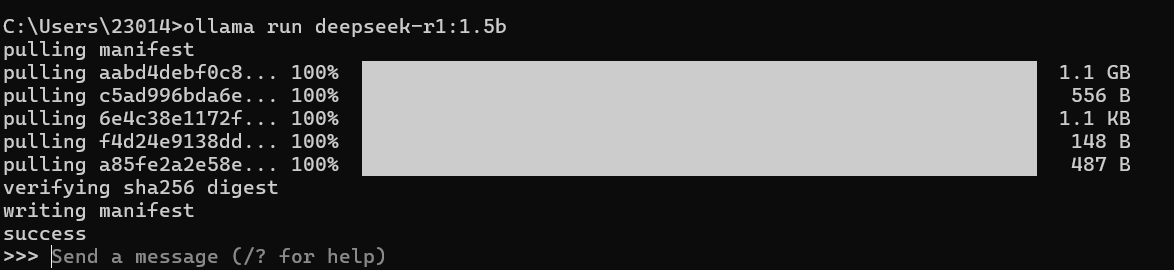
出现success即表示安装成功。
3.模型交互
安装成功后,即可输入一些内容与模型进行交互,模型将对输入的问题进行回答。
- 交互示例截图:

通过以上步骤,你可以在本地完成 Ollama 的安装,并成功下载和部署 DeepSeek 大模型,实现与模型的交互。
四、Ollama API
Ollama 本地服务的默认访问地址是http://localhost:11434,如果Ollama服务启动后访问这个url会提示Ollama is running的内容。
1. 列出本地模型
GET请求:
http://localhost:11434/api/tags
响应成功:
HTTP状态码:200,内容格式:JSON,响应示例:
{
"models":[ {
"name":"deepseek-r1:1.5b",
"model":"deepseek-r1:1.5b",
"modified_at":"2025-07-15T10:13:29.0236489+08:00",
"size":1117322768,
"digest":"e0979632db5a88d1a53884cb2a941772d10ff5d055aabaa6801c4e36f3a6c2d7",
"details": {
"parent_model": "", "format":"gguf", "family":"qwen2", "families":["qwen2"], "parameter_size":"1.8B", "quantization_level":"Q4_K_M"
}
}
]
}
2. 文本生成
单次文本生成,无上下文
POST请求:
http://localhost:11434/api/generate
请求格式:
{
"model": "deepseek-r1:1.5b", // 模型名称
"prompt": "你好", // 输入的提示词
"stream": false, // 是否启用流式响应(默认 false)
"options": { // 可选参数
"temperature": 0.7, // 温度参数
"max_tokens": 100 // 最大 token 数
}
}
响应成功:
HTTP状态码:200,内容格式:JSON,响应示例:
3. 聊天交互
支持多轮对话,模型会记录上下文
POST请求:
http://localhost:11434/api/chat
请求格式:
{
"model": "deepseek-r1:1.5b", // 模型名称
"stream": False, //流式响应
"messages": [ // 消息列表
{"role": "user", "content": "你好,我叫小明"}, // 用户的问题
{"role": "assistant", "content": "你好小明!有什么可以帮你的吗?"}, // ai的回答
{"role": "user", "content": "我刚才告诉你我叫什么了吗?"} // 用户的问题
]
}
响应成功:
HTTP状态码:200,内容格式:JSON,响应示例:
{
'model': 'deepseek-r1:1.5b',
'created_at': '2025-07-31T09:14:27.6278501Z',
'message': {
'role': 'assistant',
'content': '<think>\n\n</think>\n\n您好,小明同学。您提到的名字是“小明”,这是一个常见的中文名字,没有特殊的含义或要求。如果您需要帮助,请告诉我具体的问题或者需求,我会尽力为您提供帮助。'
},
'done_reason': 'stop',
'done': True,
'total_duration': 626249000,
'load_duration': 39893100,
'prompt_eval_count': 30,
'prompt_eval_duration': 3000000,
'eval_count': 45,
'eval_duration': 581000000
}
五、可视化聊天界面
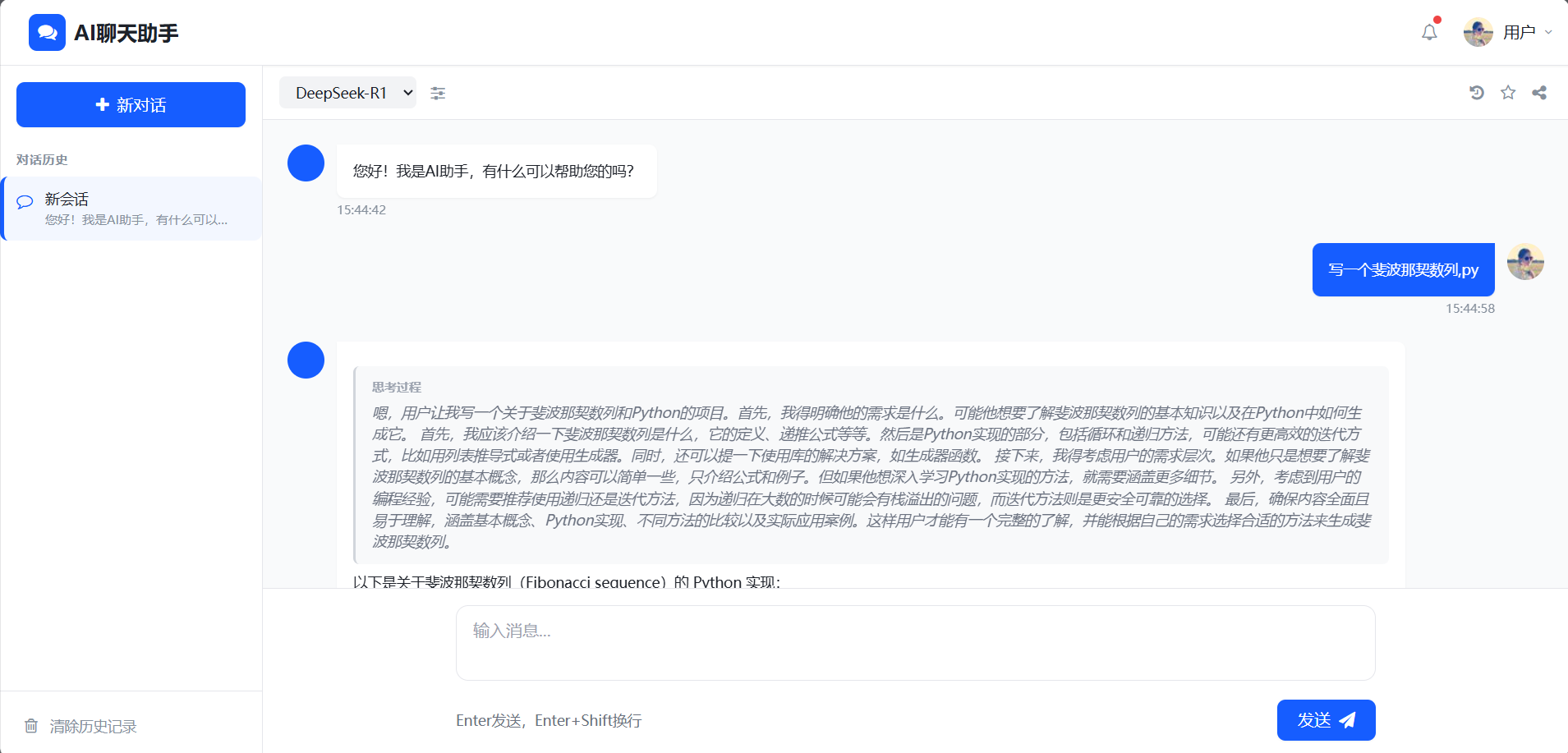
Ollama 原生无可视化聊天界面,可通过第三方工具,如 Ollama Web UI、LlamaEdge、ChatUI 等工具。我们也可以通过调用Ollama的API自行创建聊天页面。
1. 流式响应
流式响应与普通响应的区别在于数据传输方式,普通响应时,服务器会完整生成响应数据并发送给客户端,而流式响应无需等待所有数据生成完毕,而是边生成数据边向客户端发送,数据会被分成多个 “块”(chunk),每生成一块就立即发送一块,直到所有数据传输完成。例如:DeepSeek官网中的实时回复的打字效果(每生成一句就显示一句)。这种效果就是流式响应实现的。
处理ollama中的chat接口下的流式响应示例如下:
def generate():
url = 'http://localhost:11434/api/chat'
model = 'deepseek-r1:1.5b'
content = request.POST.get('message')
payload = {
"model": model,
"messages": [
{"role": "user", "content": content},
]
}
# 向chat接口发送请求
response = requests.post(url, json=payload, stream=True) # stream=True启用流式响应
with response as r:
# 遍历流式响应的每行数据
for line in r.iter_lines():
if line:
# 将传输的字节流转换为字符串,再解析为字典
data = json.loads(line.decode('utf-8'))
# 筛选出content内容
if 'message' in data and 'content' in data['message']:
content = data['message']['content']
# 转换为SSE格式
yield f"data: {json.dumps({'content': content})}\n\n"
# 流结束标志
yield "data: {\"end\": true}\n\n"
之所以要定义一个生成器generate是因为要配合Django中的一个用于流式传输数据的特殊响应类StreamingHttpResponse逐步向客户端发送响应内容。StreamingHttpResponse 接收一个迭代器(如生成器函数)作为参数,迭代器每次返回的内容会被逐步发送到客户端。
2. SSE格式
SSE(Server-Sent Events,服务器发送事件)是一种基于 HTTP 的服务器向客户端单向推送实时数据的技术格式,允许服务器主动向客户端发送信息,而无需客户端频繁请求,适用于实时通知、数据更新等场景。
SSE 的核心特点
- 单向通信:数据仅从服务器流向客户端,客户端无法通过 SSE 向服务器发送数据(需搭配其他方式如 HTTP POST 实现双向通信)。
- 基于 HTTP/HTTPS:使用常规的 HTTP 协议,无需额外协议(如 WebSocket),兼容性更好,可穿过大多数防火墙。
- 文本格式:传输的数据以文本形式编码,通常为 UTF-8,支持自定义数据格式(如 JSON、纯文本等)。
- 自动重连:客户端在连接断开时会自动尝试重连,服务器可通过
retry字段指定重连时间(毫秒)。
SSE 的消息格式
SSE 的消息由一系列字段组成,每个字段以字段名 + 冒号 + 空格 + 值的格式表示,每行以\n(换行符)分隔,消息之间以两个换行符(\n\n)分隔。常见字段包括:
data:消息的核心数据,可多行(每行前都需加data:)。
plaintext
data: 这是第一行数据
data: 这是第二行数据
event:自定义事件类型,客户端可通过addEventListener监听特定事件(默认事件为message)。
plaintext
event: update
data: 新数据
id:消息的唯一标识,客户端会记录最后接收的id,重连时通过Last-Event-ID请求头告知服务器,便于服务器恢复数据传输。
plaintext
id: 123
data: 带ID的消息
retry:指定客户端重连的间隔时间(毫秒),若服务器不指定,客户端使用默认值。
plaintext
retry: 5000
data: 5秒后重连
3. 数据处理的核心
1.后端视图
作用:生成流式数据
- 接收用户消息,向本地 Ollama 模型发送请求,获取 AI 的流式响应(Ollama 返回的是分块的增量数据)。
- 将 Ollama 返回的原始流式数据包装成符合 SSE(Server-Sent Events)协议的格式(即
data: {内容}\n\n),以便前端能识别这是 “持续推送的流式数据”。 - 通过
StreamingHttpResponse将数据持续发送给前端,而不是等待所有数据生成后一次性返回。
def stream_response(request):
if request.method == 'POST':
# 获取用户消息
user_content = request.POST.get('message')
# 创建会话和用户消息
conversation_id = request.POST.get('conversation_id')
if conversation_id:
conversation = get_object_or_404(Conversation, id=conversation_id)
else:
conversation = Conversation.objects.create()
Message.objects.create(
conversation=conversation,
content=user_content,
sender='user'
)
# 定义一个生成器
def generate():
url = 'http://localhost:11434/api/chat'
model = 'deepseek-r1:1.5b'
content = request.POST.get('message')
payload = {
"model": model,
"messages": [
{"role": "user", "content": content},
]
}
# 向chat接口发送请求
response = requests.post(url, json=payload, stream=True)
# 初始化AI回复内容
ai_content = ''
with response as r:
for line in r.iter_lines():
if line:
# 将传输的字节流转换为字符串,再解析为字典
data = json.loads(line.decode('utf-8'))
# 筛选出content内容
if 'message' in data and 'content' in data['message']:
content_chunk = data['message']['content']
ai_content += content_chunk
# 转换为SSE格式
yield f"data: {json.dumps({'content': content_chunk})}\n\n"
# 保存AI消息
Message.objects.create(
conversation=conversation,
content=ai_content,
sender='ai'
)
# 流结束标志
yield "data: {\"end\": true}\n\n"
response = StreamingHttpResponse(generate(), content_type="text/event-stream; charset=utf-8")
response['Cache-Control'] = 'no-cache'
return response
return HttpResponse("Method not allowed", status=405)
2. 前端JS
作用:消费流式数据
前端 JavaScript 需要处理流式响应的核心原因是:实时接收数据并更新用户界面。
(1)接收并解析流式数据
后端发送的是符合 SSE 协议的字符串(如 data: {"content": "你好"}\n\n),前端需要:
-
通过
ReadableStreamAPI 读取持续推送的二进制流数据。 -
将二进制数据解码为文本(通过
TextDecoder)。 -
按 SSE 格式拆分数据块(按
\n\n分割),提取data:字段后的 JSON 内容。
javascript
// 前端解析流式数据的核心代码
const reader = response.body.getReader();
const decoder = new TextDecoder();
function processStream({ done, value }) {
if (done) return;
const chunk = decoder.decode(value, { stream: true }); // 解码二进制流
const lines = chunk.split('\n\n'); // 按SSE格式拆分
lines.forEach(line => {
if (line.startsWith('data:')) {
const data = JSON.parse(line.substring(5).trim()); // 提取JSON内容
// 处理数据...
}
});
return reader.read().then(processStream); // 继续读取下一块
}
(2)实时更新 UI,实现 “打字机效果”
流式响应的核心体验是 “AI 边思考边输出”,前端需要将每一个小数据块实时显示在聊天界面上:
-
累加每个数据块的内容(
fullResponse += data.content)。 -
动态更新 DOM,将新增内容添加到 AI 消息框中。
-
实时滚动聊天区域到底部,确保用户能看到最新内容。
javascript
// 实时更新UI的核心代码
if (data.content) {
fullResponse += data.content;
output.innerHTML = renderWithThinkContent(parsedContent); // 更新消息框内容
chatMessages.scrollTop = chatMessages.scrollHeight; // 滚动到底部
}
(3)处理流结束后的收尾工作
当后端发送完所有数据(返回 data: {"end": true}\n\n),前端需要:
-
完成最终的内容渲染(如处理 Markdown 格式、代码高亮)。
-
移除 “正在输入” 的加载动画(如打字指示器)。
javascript
// 流结束后的处理
if (done) {
output.innerHTML = renderWithThinkContent(parsedContent); // 最终渲染
hljs.highlightAll(); // 代码高亮
}
4. 前端输出格式化
1. Markdown格式
使用markdown优化响应输出内容。安装django-markdownify依赖:
pip install django-markdownify
配置settings.py文件:
# 添加到INSTALLED_APPS
INSTALLED_APPS = [
# ...默认应用
'markdownify',
]
# 添加markdownify配置(用于渲染Markdown)
MARKDOWNIFY = {
"default": {
"WHITELIST_TAGS": [
'a', 'abbr', 'acronym', 'b', 'blockquote', 'em', 'i',
'li', 'ol', 'p', 'strong', 'ul', 'h1', 'h2', 'h3', 'h4',
'h5', 'h6', 'pre', 'code', 'img'
],
"WHITELIST_ATTRS": {
'a': ['href', 'title'],
'img': ['src', 'alt', 'title'],
},
}
}
对于模型思考部分可以通过响应<think></think>标签进行划分,并将思考内容切换样式显示。
2. 语法高亮
对于输出的代码块部分进行语法高亮,引入了 highlight.js 的核心库和样式文件:
<!-- 引入 highlight.js 样式(使用 github 风格) -->
<link rel="stylesheet" href="https://cdnjs.cloudflare.com/ajax/libs/highlight.js/11.9.0/styles/github.min.css">
<!-- 引入 highlight.js 核心库 -->
<script src="https://cdnjs.cloudflare.com/ajax/libs/highlight.js/11.9.0/highlight.min.js"></script>
然后使用js进行相关配置:
document.addEventListener('DOMContentLoaded', function() {
// 配置marked
marked.setOptions({
highlight: function(code, lang) {
if (lang && hljs.getLanguage(lang)) {
return hljs.highlight(code, { language: lang }).value;
}
return hljs.highlightAuto(code).value;
},
breaks: true,
gfm: true
});
// 初始化highlight.js
hljs.highlightAll();
// MathJax配置
// 如果需要重新启用公式渲染,请添加相应的数学渲染库配置
});
六、完整项目
1. 项目结构
dschat/
├── .idea/ # IDE配置文件(PyCharm)
├── .venv/ # Python虚拟环境
├── chat_app/ # 主要的应用模块
│ ├── migrations/ # 数据库迁移文件
│ ├── __init__.py # 应用初始化文件
│ ├── admin.py # Django admin配置
│ ├── apps.py # 应用配置
│ ├── models.py # 数据模型定义
│ └── views.py # 视图函数实现
├── dschat/ # 项目主配置目录
│ ├── __init__.py # 项目初始化文件
│ ├── asgi.py # ASGI配置(用于异步支持)
│ ├── settings.py # 项目设置配置
│ ├── urls.py # URL路由配置
│ └── wsgi.py # WSGI配置(用于部署)
├── templates/ # HTML模板目录
│ └── index.html # 主聊天界面模板
├── db.sqlite3 # SQLite数据库文件
└── manage.py # Django管理脚本
2. views.py
import json
import requests
from django.http import StreamingHttpResponse, HttpResponse, JsonResponse
from django.shortcuts import render, get_object_or_404
from django.views.decorators.csrf import csrf_exempt
from chat_app.models import Conversation, Message
def index(request):
conversations = Conversation.objects.all()
messages = Message.objects.all()
for conversation in conversations:
conversation.first_ai_message = conversation.messages.filter(sender='ai').first()
return render(request, 'index.html', {'conversations': conversations, 'messages': messages})
@csrf_exempt
def create_conversation(request):
if request.method == 'POST':
conversation = Conversation.objects.create()
# 创建一个默认的AI欢迎消息
Message.objects.create(
conversation=conversation,
content="您好!我是AI助手,有什么可以帮助您的吗?",
sender='ai'
)
return JsonResponse({'id': conversation.id, 'title': conversation.title})
@csrf_exempt
def stream_response(request):
if request.method == 'POST':
# 获取用户消息
user_content = request.POST.get('message')
# 创建会话和用户消息
conversation_id = request.POST.get('conversation_id')
if conversation_id:
conversation = get_object_or_404(Conversation, id=conversation_id)
else:
conversation = Conversation.objects.create()
Message.objects.create(
conversation=conversation,
content=user_content,
sender='user'
)
# 定义一个生成器
def generate():
url = 'http://localhost:11434/api/chat'
model = 'deepseek-r1:1.5b'
content = request.POST.get('message')
payload = {
"model": model,
"messages": [
{"role": "user", "content": content},
]
}
# 向chat接口发送请求
response = requests.post(url, json=payload, stream=True)
# 初始化AI回复内容
ai_content = ''
with response as r:
for line in r.iter_lines():
if line:
# 将传输的字节流转换为字符串,再解析为字典
data = json.loads(line.decode('utf-8'))
# 筛选出content内容
if 'message' in data and 'content' in data['message']:
content_chunk = data['message']['content']
ai_content += content_chunk
# 转换为SSE格式
yield f"data: {json.dumps({'content': content_chunk})}\n\n"
# 保存AI消息
Message.objects.create(
conversation=conversation,
content=ai_content,
sender='ai'
)
# 流结束标志
yield "data: {\"end\": true}\n\n"
response = StreamingHttpResponse(generate(), content_type="text/event-stream; charset=utf-8")
response['Cache-Control'] = 'no-cache'
return response
return HttpResponse("Method not allowed", status=405)
@csrf_exempt
def delete_all_conversations(request):
if request.method == 'POST':
try:
# 删除所有会话
Conversation.objects.all().delete()
return JsonResponse({'success': True, 'message': '所有会话已删除'})
except Exception as e:
return JsonResponse({'success': False, 'message': str(e)}, status=500)
return HttpResponse("Method not allowed", status=405)
@csrf_exempt
def get_conversation_messages(request, conversation_id):
if request.method == 'GET':
try:
conversation = Conversation.objects.get(id=conversation_id)
messages = conversation.messages.all().values('id', 'content', 'sender', 'time')
return JsonResponse({'messages': list(messages)})
except Conversation.DoesNotExist:
return JsonResponse({'error': '会话不存在'}, status=404)
return HttpResponse("Method not allowed", status=405)
3. urls.py
from django.contrib import admin
from django.urls import path
from chat_app import views
urlpatterns = [
path('admin/', admin.site.urls),
path('', views.index, name='index'),
path('stream_response/', views.stream_response, name='stream_response'),
path('create_conversation/', views.create_conversation, name='create_conversation'),
path('get_conversation_messages/<int:conversation_id>/', views.get_conversation_messages, name='get_conversation_messages'),
path('delete_all_conversations/', views.delete_all_conversations, name='delete_all_conversations'),
]
4. settings.py
"""
Django settings for dschat project.
Generated by 'django-admin startproject' using Django 5.2.4.
For more information on this file, see
https://docs.djangoproject.com/en/5.2/topics/settings/
For the full list of settings and their values, see
https://docs.djangoproject.com/en/5.2/ref/settings/
"""
import os
from pathlib import Path
# Build paths inside the project like this: BASE_DIR / 'subdir'.
BASE_DIR = Path(__file__).resolve().parent.parent
# Quick-start development settings - unsuitable for production
# See https://docs.djangoproject.com/en/5.2/howto/deployment/checklist/
# SECURITY WARNING: keep the secret key used in production secret!
SECRET_KEY = 'django-insecure-0+8-&3kej+%3c=3+93q+0=%t*8-7o@bux93^5*6230_@y8*x)@'
# SECURITY WARNING: don't run with debug turned on in production!
DEBUG = True
ALLOWED_HOSTS = []
# Application definition
INSTALLED_APPS = [
'django.contrib.admin',
'django.contrib.auth',
'django.contrib.contenttypes',
'django.contrib.sessions',
'django.contrib.messages',
'django.contrib.staticfiles',
'chat_app',
'markdownify',
]
MIDDLEWARE = [
'django.middleware.security.SecurityMiddleware',
'django.contrib.sessions.middleware.SessionMiddleware',
'django.middleware.common.CommonMiddleware',
'django.middleware.csrf.CsrfViewMiddleware',
'django.contrib.auth.middleware.AuthenticationMiddleware',
'django.contrib.messages.middleware.MessageMiddleware',
'django.middleware.clickjacking.XFrameOptionsMiddleware',
]
ROOT_URLCONF = 'dschat.urls'
TEMPLATES = [
{
'BACKEND': 'django.template.backends.django.DjangoTemplates',
'DIRS': [BASE_DIR / 'templates']
,
'APP_DIRS': True,
'OPTIONS': {
'context_processors': [
'django.template.context_processors.request',
'django.contrib.auth.context_processors.auth',
'django.contrib.messages.context_processors.messages',
],
},
},
]
WSGI_APPLICATION = 'dschat.wsgi.application'
# Database
# https://docs.djangoproject.com/en/5.2/ref/settings/#databases
DATABASES = {
'default': {
'ENGINE': 'django.db.backends.sqlite3',
'NAME': BASE_DIR / 'db.sqlite3',
}
}
# Password validation
# https://docs.djangoproject.com/en/5.2/ref/settings/#auth-password-validators
AUTH_PASSWORD_VALIDATORS = [
{
'NAME': 'django.contrib.auth.password_validation.UserAttributeSimilarityValidator',
},
{
'NAME': 'django.contrib.auth.password_validation.MinimumLengthValidator',
},
{
'NAME': 'django.contrib.auth.password_validation.CommonPasswordValidator',
},
{
'NAME': 'django.contrib.auth.password_validation.NumericPasswordValidator',
},
]
# Internationalization
# https://docs.djangoproject.com/en/5.2/topics/i18n/
LANGUAGE_CODE = 'zh-hans'
TIME_ZONE = 'Asia/Shanghai'
USE_I18N = True
USE_TZ = True
# Static files (CSS, JavaScript, Images)
# https://docs.djangoproject.com/en/5.2/howto/static-files/
STATIC_URL = 'static/'
# Default primary key field type
# https://docs.djangoproject.com/en/5.2/ref/settings/#default-auto-field
DEFAULT_AUTO_FIELD = 'django.db.models.BigAutoField'
MARKDOWNIFY = {
"default": {
"WHITELIST_TAGS": [
'a', 'abbr', 'acronym', 'b', 'blockquote', 'em', 'i',
'li', 'ol', 'p', 'strong', 'ul', 'h1', 'h2', 'h3', 'h4',
'h5', 'h6', 'pre', 'code', 'img'
],
"WHITELIST_ATTRS": {
'a': ['href', 'title'],
'img': ['src', 'alt', 'title'],
},
}
}
5. models.py
from django.db import models
# Create your models here.
class Conversation(models.Model):
"""会话模型,代表一次完整的聊天会话"""
title = models.CharField(max_length=200, default="新会话") # 会话标题
created_at = models.DateTimeField(auto_now_add=True) # 创建时间
updated_at = models.DateTimeField(auto_now=True) # 更新时间
class Meta:
ordering = ['-updated_at'] # 按更新时间倒序排列,最近的会话在前面
verbose_name = "会话"
verbose_name_plural = "会话"
def __str__(self):
return self.title or f"会话 {self.id}"
def title_user_message(self):
"""从会话中用户发送的第一条消息更新标题"""
# 查找当前会话中用户发送的第一条消息
first_user_msg = self.messages.filter(sender='user').order_by('time').first()
if first_user_msg:
# 截取前30个字符作为标题,超过则加省略号
self.title = first_user_msg.content[:30] + ("..." if len(first_user_msg.content) > 30 else "")
self.save(update_fields=['title']) # 只更新title字段,提高效率
class Message(models.Model):
"""消息模型,代表会话中的一条消息"""
SENDER_CHOICES = (
('user', '用户'),
('ai', 'AI'),
)
conversation = models.ForeignKey(
Conversation,
on_delete=models.CASCADE,
related_name="messages"
)
content = models.TextField() # 消息内容
sender = models.CharField(max_length=10, choices=SENDER_CHOICES) # 发送者
time = models.DateTimeField(auto_now_add=True) # 发送时间
class Meta:
ordering = ['time'] # 按时间顺序排列消息
verbose_name = "消息"
verbose_name_plural = "消息"
def __str__(self):
return f"{self.get_sender_display()}: {self.content[:20]}"
6. index.html
<!DOCTYPE html>
<html lang="zh-CN">
<head>
<meta charset="UTF-8">
<meta name="viewport" content="width=device-width, initial-scale=1.0">
<title>AI聊天助手</title>
<script src="https://cdn.tailwindcss.com"></script>
<link href="https://cdn.jsdelivr.net/npm/font-awesome@4.7.0/css/font-awesome.min.css" rel="stylesheet">
<script src="https://cdn.jsdelivr.net/npm/marked/marked.min.js"></script>
<link rel="stylesheet" href="https://cdnjs.cloudflare.com/ajax/libs/highlight.js/11.9.0/styles/github.min.css">
<script src="https://cdnjs.cloudflare.com/ajax/libs/highlight.js/11.9.0/highlight.min.js"></script>
<!-- 配置Tailwind自定义主题 -->
<script>
tailwind.config = {
theme: {
extend: {
colors: {
primary: '#165DFF',
secondary: '#36CFC9',
dark: '#1D2129',
light: '#F2F3F5',
'gray-light': '#E5E6EB',
'gray-medium': '#C9CDD4',
'gray-dark': '#86909C'
},
fontFamily: {
inter: ['Inter', 'system-ui', 'sans-serif'],
},
}
}
}
</script>
<style type="text/tailwindcss">
@layer utilities {
.content-auto {
content-visibility: auto;
}
.scrollbar-hide {
scrollbar-width: none;
-ms-overflow-style: none;
}
.scrollbar-hide::-webkit-scrollbar {
display: none;
}
.message-appear {
animation: fadeIn 0.3s ease-out forwards;
}
.typing-indicator {
display: inline-flex;
align-items: center;
gap: 2px;
}
.typing-indicator span {
width: 8px;
height: 8px;
border-radius: 50%;
background-color: #86909C;
animation: typing 1.4s infinite ease-in-out both;
}
.typing-indicator span:nth-child(1) {
animation-delay: -0.32s;
}
.typing-indicator span:nth-child(2) {
animation-delay: -0.16s;
}
}
@keyframes fadeIn {
from {
opacity: 0;
transform: translateY(10px);
}
to {
opacity: 1;
transform: translateY(0);
}
}
@keyframes typing {
0% {
transform: scale(0);
}
40% {
transform: scale(1);
}
80% {
transform: scale(0);
}
100% {
transform: scale(0);
}
}
.think-container {
background-color: #f8f9fa;
border-left: 3px solid #d1d5db;
padding: 12px 16px;
margin: 8px 0;
border-radius: 6px;
font-style: italic;
color: #6b7280;
font-size: 0.875rem;
line-height: 1.5;
}
.think-container::before {
content: "思考过程";
display: block;
font-weight: 600;
font-size: 0.75rem;
color: #9ca3af;
margin-bottom: 4px;
font-style: normal;
}
.think-content {
color: #6b7280;
font-style: italic;
}
/* 自定义markdown样式 */
.prose pre {
background-color: #f8f9fa;
border: 1px solid #e9ecef;
border-radius: 6px;
padding: 12px;
overflow-x: auto;
}
.prose code {
background-color: #f1f3f4;
padding: 2px 4px;
border-radius: 3px;
font-size: 0.875em;
}
.prose pre code {
background-color: transparent;
padding: 0;
font-size: 0.875em;
}
.prose blockquote {
border-left: 4px solid #d1d5db;
padding-left: 1em;
margin-left: 0;
font-style: italic;
color: #6b7280;
}
</style>
</head>
<body class="font-inter bg-gray-50 text-dark h-screen flex flex-col overflow-hidden">
<!-- 顶部导航栏 -->
<header class="bg-white border-b border-gray-light px-4 py-3 flex items-center justify-between shadow-sm z-10">
<div class="flex items-center space-x-3">
<button id="sidebar-toggle" class="lg:hidden p-2 rounded-full hover:bg-light transition-colors">
<i class="fa fa-bars text-gray-dark"></i>
</button>
<div class="flex items-center space-x-2">
<div class="w-9 h-9 rounded-lg bg-primary flex items-center justify-center">
<i class="fa fa-comments text-white text-lg"></i>
</div>
<h1 class="text-xl font-semibold">AI聊天助手</h1>
</div>
</div>
<div class="flex items-center space-x-4">
<button class="p-2 rounded-full hover:bg-light transition-colors relative">
<i class="fa fa-bell-o text-gray-dark"></i>
<span class="absolute top-1 right-1 w-2 h-2 bg-red-500 rounded-full"></span>
</button>
<div class="flex items-center space-x-2 cursor-pointer group">
<img src="https://picsum.photos/id/64/40/40" alt="用户头像" class="w-8 h-8 rounded-full object-cover border-2 border-transparent group-hover:border-primary transition-all">
<span class="hidden md:inline-block font-medium">用户</span>
<i class="fa fa-angle-down text-gray-dark text-xs"></i>
</div>
</div>
</header>
<div class="flex flex-1 overflow-hidden">
<!-- 侧边栏 -->
<aside id="create-conversation" class="w-64 bg-white border-r border-gray-light flex-shrink-0 flex flex-col transform -translate-x-full lg:translate-x-0 transition-transform duration-300 ease-in-out fixed lg:relative h-[calc(100vh-61px)] z-20">
<!-- 新对话按钮 -->
<button id="new-conversation-btn" class="m-4 px-4 py-2.5 bg-primary text-white rounded-lg font-medium hover:bg-primary/90 transition-colors flex items-center justify-center space-x-2 shadow-sm">
<i class="fa fa-plus"></i>
<span>新对话</span>
</button>
<!-- 对话历史 -->
<div class="flex-1 overflow-y-auto scrollbar-hide">
<div class="px-4 py-2 text-xs font-semibold text-gray-dark uppercase tracking-wider">
对话历史
</div>
<div class="space-y-1" id="conversation-list">
{% if conversations %}
{% for conversation in conversations %}
<div class="flex items-start p-3 hover:bg-light rounded-lg cursor-pointer transition-colors duration-200 {% if conversation.id == current_conversation_id %}bg-primary/5 border-l-4 border-primary{% endif %}" data-conversation-id="{{ conversation.id }}">
<i class="fa fa-comment-o text-primary mt-1 mr-3"></i>
<div class="flex-1 min-w-0">
<p class="text-sm font-medium truncate">{{ conversation.title }}</p>
<p class="text-xs text-gray-dark truncate mt-0.5">{{ conversation.first_ai_message.content|truncatechars:30 }}</p>
</div>
<button class="text-gray-dark hover:text-dark p-1 opacity-0 group-hover:opacity-100 transition-opacity">
<i class="fa fa-ellipsis-v"></i>
</button>
</div>
{% endfor %}
{% endif %}
</div>
</div>
<!-- 侧边栏底部 -->
<div class="p-4 border-t border-gray-light">
<button class="w-full flex items-center justify-start space-x-3 text-gray-dark hover:text-dark p-2 rounded-lg hover:bg-light transition-colors">
<i class="fa fa-trash-o"></i>
<span class="text-sm">清除历史记录</span>
</button>
</div>
</aside>
<!-- 主聊天区域 -->
<main class="flex-1 flex flex-col bg-gray-50 overflow-hidden">
<!-- 模型选择栏 -->
<div class="bg-white border-b border-gray-light px-4 py-2 flex items-center justify-between">
<div class="flex items-center space-x-2">
<select class="bg-light border-none rounded-md px-3 py-1.5 text-sm focus:outline-none focus:ring-1 focus:ring-primary">
<option>DeepSeek-R1</option>
<option>GPT-4</option>
<option>GPT-3.5</option>
<option>Claude</option>
<option>LLaMA 2</option>
</select>
<button class="p-1.5 rounded-md hover:bg-light text-gray-dark">
<i class="fa fa-sliders"></i>
</button>
</div>
<div class="flex items-center space-x-1">
<button class="p-1.5 rounded-md hover:bg-light text-gray-dark">
<i class="fa fa-history"></i>
</button>
<button class="p-1.5 rounded-md hover:bg-light text-gray-dark">
<i class="fa fa-star-o"></i>
</button>
<button class="p-1.5 rounded-md hover:bg-light text-gray-dark">
<i class="fa fa-share-alt"></i>
</button>
</div>
</div>
<!-- 聊天消息区域 -->
<div id="chat-messages" class="flex-1 overflow-y-auto p-4 md:p-6 space-y-6 scrollbar-hide">
{% if conversations %}
<!-- 加载的消息会在这里显示 -->
{% else %}
<!-- 无会话提示 - 在HTML中判断显示 -->
<div id="no-conversation-prompt" class="flex flex-col items-center justify-center h-full text-center p-6">
<div class="w-20 h-20 rounded-full bg-primary/10 flex items-center justify-center mb-6">
<i class="fa fa-comments text-primary text-2xl"></i>
</div>
<h3 class="text-xl font-semibold mb-2">暂无对话记录</h3>
<p class="text-gray-dark mb-8 max-w-md">开始您的第一次对话吧!点击下方按钮创建新对话,与AI助手交流。</p>
<button id="create-first-conversation" class="bg-primary text-white px-6 py-3 rounded-lg font-medium hover:bg-primary/90 transition-colors shadow-sm flex items-center justify-center space-x-2">
<i class="fa fa-plus"></i>
<span>新对话</span>
</button>
</div>
{% endif %}
</div>
<!-- 输入区域 - 条件显示 -->
{% if conversations %}
<div class="bg-white border-t border-gray-light p-4">
<div class="relative max-w-4xl mx-auto">
<textarea
id="input"
placeholder="输入消息..."
name="content"
class="w-full px-4 py-3 pr-12 rounded-xl border border-gray-light focus:border-primary focus:ring-1 focus:ring-primary focus:outline-none resize-none transition-all min-h-[50px] max-h-[200px] overflow-y-auto"
></textarea>
</div>
<div class="flex justify-between items-center mt-3 max-w-4xl mx-auto">
<div id="input-hint" class="flex items-center space-x-2 text-gray-500 text-sm">
Enter发送,Enter+Shift换行
</div>
<button id="send-button" class="bg-primary hover:bg-primary/90 text-white px-5 py-2 rounded-lg font-medium transition-colors shadow-sm flex items-center">
<span>发送</span>
<i class="fa fa-paper-plane ml-2"></i>
</button>
</div>
</div>
{% endif %}
</main>
</div>
<!-- 确认清除历史记录模态框 -->
<div id="confirm-modal" class="fixed inset-0 bg-black/50 flex items-center justify-center z-50 hidden">
<div class="bg-white rounded-lg p-6 w-full max-w-md shadow-xl transform transition-all">
<div class="text-center mb-4">
<div class="w-16 h-16 rounded-full bg-red-100 flex items-center justify-center mx-auto mb-4">
<i class="fa fa-exclamation-triangle text-red-500 text-2xl"></i>
</div>
<h3 class="text-lg font-semibold mb-2">确认清除历史记录</h3>
<p class="text-gray-dark text-sm">此操作将删除所有会话记录,不可恢复。</p>
</div>
<div class="flex space-x-3 mt-6">
<button id="cancel-delete" class="flex-1 px-4 py-2 border border-gray-light rounded-lg text-gray-dark hover:bg-light transition-colors">
取消
</button>
<button id="confirm-delete" class="flex-1 px-4 py-2 bg-red-500 text-white rounded-lg hover:bg-red-600 transition-colors">
确认删除
</button>
</div>
</div>
</div>
<!-- 遮罩层 -->
<div id="overlay" class="fixed inset-0 bg-black/50 z-10 lg:hidden hidden" onclick="toggleSidebar()"></div>
</body>
</html>
<script>
// 当前选中的会话ID
let currentConversationId = {{ current_conversation_id|default:"null" }};
/**
* 从URL获取会话ID
*/
function getConversationIdFromUrl() {
const urlParams = new URLSearchParams(window.location.search);
const id = urlParams.get('conversation_id');
return id ? parseInt(id) : null;
}
/**
* 更新URL中的会话ID
*/
function updateUrlWithConversationId(id) {
const url = new URL(window.location);
url.searchParams.set('conversation_id', id);
window.history.pushState({ id }, '', url);
}
/**
* 切换侧边栏显示/隐藏
*/
function toggleSidebar() {
const sidebar = document.getElementById('create-conversation');
const overlay = document.getElementById('overlay');
sidebar.classList.toggle('-translate-x-full');
overlay.classList.toggle('hidden');
}
/**
* 页面加载完成后执行
*/
document.addEventListener('DOMContentLoaded', function() {
// 优先从URL获取会话ID
const urlConversationId = getConversationIdFromUrl();
if (urlConversationId) {
currentConversationId = urlConversationId;
loadConversationMessages(currentConversationId);
// 选中URL指定的会话项
const currentItem = document.querySelector(`[data-conversation-id="${urlConversationId}"]`);
if (currentItem) {
document.querySelectorAll('[data-conversation-id]').forEach(item => {
item.classList.remove('bg-primary/5', 'border-l-4', 'border-primary');
});
currentItem.classList.add('bg-primary/5', 'border-l-4', 'border-primary');
}
} else {
// 从第一个会话项获取ID
const firstConversation = document.querySelector('[data-conversation-id]');
if (firstConversation) {
currentConversationId = parseInt(firstConversation.getAttribute('data-conversation-id'));
// 加载当前会话的消息
loadConversationMessages(currentConversationId);
}
}
// 为所有会话项绑定点击事件
document.querySelectorAll('[data-conversation-id]').forEach(item => {
item.addEventListener('click', function() {
const conversationId = parseInt(this.getAttribute('data-conversation-id'));
switchConversation(conversationId);
});
});
// 绑定新对话按钮点击事件
document.getElementById('new-conversation-btn').addEventListener('click', createNewConversation);
// 为无会话提示中的创建新会话按钮绑定事件
const createFirstConversationBtn = document.getElementById('create-first-conversation');
if (createFirstConversationBtn) {
createFirstConversationBtn.addEventListener('click', createNewConversation);
}
// 绑定发送按钮点击事件
const sendButton = document.getElementById('send-button');
if (sendButton) {
sendButton.addEventListener('click', sendMessage);
}
});
/**
* 切换会话
*/
function switchConversation(conversationId) {
currentConversationId = conversationId;
// 更新URL
updateUrlWithConversationId(conversationId);
// 移除所有会话项的选中状态
document.querySelectorAll('[data-conversation-id]').forEach(item => {
item.classList.remove('bg-primary/5', 'border-l-4', 'border-primary');
});
// 添加当前会话项的选中状态
const currentItem = document.querySelector(`[data-conversation-id="${conversationId}"]`);
if (currentItem) {
currentItem.classList.add('bg-primary/5', 'border-l-4', 'border-primary');
}
// 加载会话消息
loadConversationMessages(conversationId);
}
/**
* 创建新会话
*/
function createNewConversation() {
fetch('/create_conversation/', {
method: 'POST',
headers: {
'Content-Type': 'application/json',
'X-CSRFToken': getCSRFToken()
}
})
.then(response => response.json())
.then(data => {
// 更新当前会话ID
currentConversationId = data.id;
// 更新URL
updateUrlWithConversationId(currentConversationId);
// 加载新会话消息
loadConversationMessages(currentConversationId);
// 更新会话列表
updateConversationList();
// 确保显示消息发送框
setTimeout(() => {
const messageInputArea = document.querySelector('main .p-4.border-t');
if (messageInputArea) {
messageInputArea.style.display = 'block';
} else {
// 如果输入框区域不存在,手动创建并添加
const mainElement = document.querySelector('main');
if (mainElement) {
// 创建输入框区域
const inputArea = document.createElement('div');
inputArea.className = 'bg-white border-t border-gray-light p-4';
inputArea.innerHTML = `
<div class="relative max-w-4xl mx-auto">
<textarea
id="input"
placeholder="输入消息..."
name="content"
class="w-full px-4 py-3 pr-12 rounded-xl border border-gray-light focus:border-primary focus:ring-1 focus:ring-primary focus:outline-none resize-none transition-all min-h-[50px] max-h-[200px] overflow-y-auto"
></textarea>
</div>
<div class="flex justify-between items-center mt-3 max-w-4xl mx-auto">
<div class="flex items-center space-x-2">
Enter发送,Enter+Shift换行
</div>
<button id="send-button" class="bg-primary hover:bg-primary/90 text-white px-5 py-2 rounded-lg font-medium transition-colors shadow-sm flex items-center">
<span>发送</span>
<i class="fa fa-paper-plane ml-2"></i>
</button>
</div>
`;
mainElement.appendChild(inputArea);
// 为发送按钮绑定事件
document.getElementById('send-button').addEventListener('click', sendMessage);
}
}
}, 100);
// 移除无会话提示
const noConversationPrompt = document.getElementById('no-conversation-prompt');
if (noConversationPrompt) {
noConversationPrompt.remove();
}
})
.catch(error => {
console.error('创建会话失败:', error);
});
}
/**
* 更新会话列表
*/
function updateConversationList() {
fetch('/')
.then(response => response.text())
.then(html => {
const parser = new DOMParser();
const doc = parser.parseFromString(html, 'text/html');
const newConversationList = doc.querySelector('.scrollbar-hide > .space-y-1');
if (newConversationList) {
const currentConversationList = document.querySelector('.scrollbar-hide > .space-y-1');
currentConversationList.innerHTML = newConversationList.innerHTML;
// 重新绑定会话项的点击事件
document.querySelectorAll('[data-conversation-id]').forEach(item => {
item.addEventListener('click', function() {
const conversationId = parseInt(this.getAttribute('data-conversation-id'));
switchConversation(conversationId);
});
});
// 选中当前会话
const currentItem = document.querySelector(`[data-conversation-id="${currentConversationId}"]`);
if (currentItem) {
document.querySelectorAll('[data-conversation-id]').forEach(item => {
item.classList.remove('bg-primary/5', 'border-l-4', 'border-primary');
});
currentItem.classList.add('bg-primary/5', 'border-l-4', 'border-primary');
}
}
})
.catch(error => {
console.error('更新会话列表失败:', error);
});
}
/**
* 加载会话消息
*/
function loadConversationMessages(conversationId) {
fetch(`/get_conversation_messages/${conversationId}/`)
.then(response => response.json())
.then(data => {
const chatMessages = document.getElementById('chat-messages');
// 清空当前消息
chatMessages.innerHTML = '';
// 添加消息
data.messages.forEach(message => {
const messageElement = document.createElement('div');
if (message.sender === 'user') {
messageElement.className = 'flex items-start justify-end message-appear';
messageElement.innerHTML = `
<div class="mr-3 w-fit max-w-[85%]">
<div class="bg-primary text-white p-4 rounded-lg rounded-tr-none shadow-sm w-fit">
<p class="text-sm">${message.content}</p>
</div>
<p class="text-xs text-gray-dark mt-1 text-right">${new Date(message.time).toLocaleTimeString()}</p>
</div>
<div class="w-9 h-9 rounded-full bg-gray-medium flex-shrink-0 overflow-hidden">
<img src="https://picsum.photos/id/64/40/40" alt="用户头像" class="w-full h-full object-cover">
</div>
`;
} else {
// 解析AI消息中的思考内容
const parsedContent = parseThinkContent(message.content);
let contentHTML = '';
// 只有当有思考内容且思考内容不为空时才渲染思考容器
if (parsedContent.hasThink && parsedContent.thinkContent && parsedContent.thinkContent.trim() !== '') {
contentHTML += `<div class="think-container">
<div class="think-content">${parsedContent.thinkContent}</div>
</div>`;
}
if (parsedContent.mainContent) {
const renderedMarkdown = marked.parse(parsedContent.mainContent);
contentHTML += `<div class="main-content prose prose-sm max-w-none">${renderedMarkdown}</div>`;
}
messageElement.className = 'flex items-start message-appear';
messageElement.innerHTML = `
<div class="w-9 h-9 rounded-full bg-primary flex-shrink-0 flex items-center justify-center">
<i class="fa fa-robot text-white"></i>
</div>
<div class="ml-3 w-fit max-w-[85%]">
<div class="bg-white p-4 rounded-lg rounded-tl-none shadow-sm w-fit">
<div class="text-sm">${contentHTML}</div>
</div>
<p class="text-xs text-gray-dark mt-1">${new Date(message.time).toLocaleTimeString()}</p>
</div>
`;
}
chatMessages.appendChild(messageElement);
});
// 滚动到底部
chatMessages.scrollTop = chatMessages.scrollHeight;
// 应用代码高亮
setTimeout(() => {
hljs.highlightAll();
}, 100);
})
.catch(error => {
console.error('加载会话消息失败:', error);
});
}
/**
* 发送用户消息并处理流式响应
*/
function sendMessage() {
// 获取DOM元素:输入框
const input = document.getElementById('input');
// 获取并清理用户输入内容
const message = input.value.trim();
// 验证输入不为空
if (!message) return;
// 清空输入框
input.value = '';
// 创建加载状态元素
const chatMessages = document.getElementById('chat-messages');
// 添加用户消息
const userMessage = document.createElement('div');
userMessage.className = 'flex items-start justify-end message-appear';
userMessage.innerHTML = `
<div class="mr-3 w-fit max-w-[85%]">
<div class="bg-primary text-white p-4 rounded-lg rounded-tr-none shadow-sm w-fit">
<p class="text-sm">${message}</p>
</div>
<p class="text-xs text-gray-dark mt-1 text-right">${new Date().toLocaleTimeString()}</p>
</div>
<div class="w-9 h-9 rounded-full bg-gray-medium flex-shrink-0 overflow-hidden">
<img src="https://picsum.photos/id/64/40/40" alt="用户头像" class="w-full h-full object-cover">
</div>
`;
chatMessages.appendChild(userMessage);
// 自动滚动到底部
chatMessages.scrollTop = chatMessages.scrollHeight;
// 添加加载状态
const loadingElement = document.createElement('div');
loadingElement.className = 'flex items-start message-appear';
loadingElement.innerHTML = `
<div class="w-9 h-9 rounded-full bg-primary flex-shrink-0 flex items-center justify-center">
<i class="fa fa-robot text-white"></i>
</div>
<div class="ml-3 w-fit max-w-[85%]">
<div class="bg-white p-4 rounded-lg rounded-tl-none shadow-sm">
<div class="typing-indicator">
<span></span>
<span></span>
<span></span>
</div>
</div>
</div>
`;
chatMessages.appendChild(loadingElement);
// 使用Fetch API发送POST请求到流式响应接口
fetch('/stream_response/', {
method: 'POST',
headers: {
// 设置内容类型为表单编码
'Content-Type': 'application/x-www-form-urlencoded',
// 添加CSRF令牌以通过Django安全验证
'X-CSRFToken': getCSRFToken()
},
// 编码并发送用户消息和会话ID
body: `message=${encodeURIComponent(message)}${currentConversationId ? `&conversation_id=${currentConversationId}` : ''}`
})
.then(response => {
// 检查HTTP响应状态
if (!response.ok) throw new Error('请求失败');
// 创建读取器处理流式响应
const reader = response.body.getReader();
// 创建解码器将二进制流转换为文本
const decoder = new TextDecoder();
// 移除加载状态元素
chatMessages.removeChild(loadingElement);
// 创建新的AI消息元素
const aiMessage = document.createElement('div');
aiMessage.className = 'flex items-start message-appear';
// 创建消息内容容器
const messageContent = document.createElement('div');
messageContent.className = 'ml-3 w-fit max-w-[85%]';
// 创建消息气泡
const messageBubble = document.createElement('div');
messageBubble.className = 'bg-white p-4 rounded-lg rounded-tl-none shadow-sm w-fit';
// 创建输出区域
const output = document.createElement('div');
output.className = 'text-sm mb-3';
// 创建时间戳
const timestamp = document.createElement('p');
timestamp.className = 'text-xs text-gray-dark mt-1';
timestamp.textContent = new Date().toLocaleTimeString();
// 组装消息元素
messageBubble.appendChild(output);
messageContent.appendChild(messageBubble);
messageContent.appendChild(timestamp);
aiMessage.innerHTML = `
<div class="w-9 h-9 rounded-full bg-primary flex-shrink-0 flex items-center justify-center">
<i class="fa fa-robot text-white"></i>
</div>
`;
aiMessage.appendChild(messageContent);
chatMessages.appendChild(aiMessage);
// 自动滚动到底部
chatMessages.scrollTop = chatMessages.scrollHeight;
// 存储完整响应内容的累加变量
let fullResponse = '';
/**
* 递归处理流式数据
*/
function processStream({ done, value }) {
// 流结束时退出处理
if (done) {
// 流结束时,确保最终内容正确渲染
if (fullResponse) {
const parsedContent = parseThinkContent(fullResponse);
output.innerHTML = renderWithThinkContent(parsedContent);
// 重新应用代码高亮
setTimeout(() => {
hljs.highlightAll();
}, 50);
chatMessages.scrollTop = chatMessages.scrollHeight;
}
return;
}
// 解码当前流片段(stream: true表示后续还有数据)
const chunk = decoder.decode(value, { stream: true });
// 按SSE格式分隔符(\n\n)拆分数据
const lines = chunk.split('\n\n');
// 处理每个SSE事件行
lines.forEach(line => {
// 筛选以'data:'开头的SSE数据行
if (line.startsWith('data:')) {
try {
// 提取并解析JSON数据(移除'data:'前缀并修剪空白)
const data = JSON.parse(line.substring(5).trim());
// 如果包含content字段,则累加内容并更新UI
if (data.content) {
fullResponse += data.content;
const parsedContent = parseThinkContent(fullResponse);
output.innerHTML = renderWithThinkContent(parsedContent);
// 重新应用代码高亮
setTimeout(() => {
hljs.highlightAll();
}, 50);
// 自动滚动到底部
chatMessages.scrollTop = chatMessages.scrollHeight;
}
} catch (e) {
// 捕获JSON解析错误
console.error('解析错误:', e);
}
}
});
// 继续读取下一个流片段
return reader.read().then(processStream);
}
// 开始处理流式响应
return reader.read().then(processStream);
})
.catch(error => {
// 显示错误提示并自动消失
const errorElement = document.createElement('div');
errorElement.className = 'fixed bottom-4 right-4 bg-red-500 text-white px-4 py-2 rounded-lg shadow-lg';
errorElement.textContent = '发送失败,请重试';
document.body.appendChild(errorElement);
setTimeout(() => {
document.body.removeChild(errorElement);
}, 3000);
});
}
/**
* 获取Django CSRF令牌
*/
function getCSRFToken() {
// 拆分cookie字符串
const cookies = document.cookie.split(';');
// 遍历查找csrftoken cookie
for (let cookie of cookies) {
const [name, value] = cookie.trim().split('=');
if (name === 'csrftoken') return value;
}
// 未找到时返回空字符串
return '';
}
/**
* 解析思考内容的函数
*/
function parseThinkContent(content) {
const thinkRegex = /<think>(.*?)<\/think>/s;
const match = content.match(thinkRegex);
if (match) {
const thinkContent = match[1].trim();
const mainContent = content.replace(thinkRegex, '').trim();
return {
hasThink: true,
thinkContent: thinkContent,
mainContent: mainContent
};
}
return {
hasThink: false,
thinkContent: '',
mainContent: content
};
}
/**
* 渲染带有思考内容的HTML,支持markdown格式
*/
function renderWithThinkContent(parsedContent) {
let html = '';
// 只有当有思考内容且思考内容不为空时才渲染思考容器
if (parsedContent.hasThink && parsedContent.thinkContent && parsedContent.thinkContent.trim() !== '') {
html += `<div class="think-container">
<div class="think-content">${parsedContent.thinkContent}</div>
</div>`;
}
if (parsedContent.mainContent) {
// 使用marked渲染markdown内容
const renderedMarkdown = marked.parse(parsedContent.mainContent);
html += `<div class="main-content prose prose-sm max-w-none">${renderedMarkdown}</div>`;
}
// 渲染数学公式(已移除MathJax相关代码)
// 如果需要重新启用公式渲染,请添加相应的数学渲染库配置
return html;
}
/**
* 配置marked、highlight.js和MathJax
*/
document.addEventListener('DOMContentLoaded', function() {
// 配置marked
marked.setOptions({
highlight: function(code, lang) {
if (lang && hljs.getLanguage(lang)) {
return hljs.highlight(code, { language: lang }).value;
}
return hljs.highlightAuto(code).value;
},
breaks: true,
gfm: true
});
// 初始化highlight.js
hljs.highlightAll();
// MathJax配置(已移除)
// 如果需要重新启用公式渲染,请添加相应的数学渲染库配置
});
/**
* 页面加载完成后执行的额外初始化
*/
document.addEventListener('DOMContentLoaded', function() {
// 获取清除历史记录按钮
const clearHistoryBtn = document.querySelector('aside .p-4.border-t button');
if (clearHistoryBtn) {
clearHistoryBtn.addEventListener('click', showConfirmModal);
}
// 获取确认模态框相关元素
const confirmModal = document.getElementById('confirm-modal');
const cancelDeleteBtn = document.getElementById('cancel-delete');
const confirmDeleteBtn = document.getElementById('confirm-delete');
// 绑定取消按钮点击事件
if (cancelDeleteBtn) {
cancelDeleteBtn.addEventListener('click', function() {
confirmModal.classList.add('hidden');
});
}
// 绑定确认删除按钮点击事件
if (confirmDeleteBtn) {
confirmDeleteBtn.addEventListener('click', deleteAllConversations);
}
// 点击模态框外部关闭
if (confirmModal) {
confirmModal.addEventListener('click', function(e) {
if (e.target === confirmModal) {
confirmModal.classList.add('hidden');
}
});
}
});
/**
* 显示确认模态框
*/
function showConfirmModal() {
const confirmModal = document.getElementById('confirm-modal');
if (confirmModal) {
confirmModal.classList.remove('hidden');
}
}
/**
* 删除所有会话
*/
function deleteAllConversations() {
fetch('/delete_all_conversations/', {
method: 'POST',
headers: {
'Content-Type': 'application/json',
'X-CSRFToken': getCSRFToken()
}
})
.then(response => response.json())
.then(data => {
if (data.success) {
// 重置当前会话ID
currentConversationId = null;
// 关闭模态框
const confirmModal = document.getElementById('confirm-modal');
if (confirmModal) {
confirmModal.classList.add('hidden');
}
// 更新会话列表
updateConversationList();
// 清空聊天消息区域
const chatMessages = document.getElementById('chat-messages');
if (chatMessages) {
chatMessages.innerHTML = '';
}
// 显示无会话提示
const noConversationPrompt = document.createElement('div');
noConversationPrompt.id = 'no-conversation-prompt';
noConversationPrompt.className = 'flex flex-col items-center justify-center h-full text-center p-6';
noConversationPrompt.innerHTML = `
<div class="w-20 h-20 rounded-full bg-primary/10 flex items-center justify-center mb-6">
<i class="fa fa-comments text-primary text-2xl"></i>
</div>
<h3 class="text-xl font-semibold mb-2">暂无对话记录</h3>
<p class="text-gray-dark mb-8 max-w-md">开始您的第一次对话吧!点击下方按钮创建新对话,与AI助手交流。</p>
<button id="create-first-conversation" class="bg-primary text-white px-6 py-3 rounded-lg font-medium hover:bg-primary/90 transition-colors shadow-sm flex items-center justify-center space-x-2">
<i class="fa fa-plus"></i>
<span>新对话</span>
</button>
`;
chatMessages.appendChild(noConversationPrompt);
// 为新创建的按钮绑定事件
const createFirstConversationBtn = document.getElementById('create-first-conversation');
if (createFirstConversationBtn) {
createFirstConversationBtn.addEventListener('click', createNewConversation);
}
// 隐藏消息输入框
const messageInputArea = document.querySelector('main .p-4.border-t');
if (messageInputArea) {
messageInputArea.style.display = 'none';
}
// 显示成功提示
const successElement = document.createElement('div');
successElement.className = 'fixed bottom-4 right-4 bg-green-500 text-white px-4 py-2 rounded-lg shadow-lg';
successElement.textContent = '所有会话已清除';
document.body.appendChild(successElement);
setTimeout(() => {
document.body.removeChild(successElement);
}, 3000);
} else {
// 显示错误提示
const errorElement = document.createElement('div');
errorElement.className = 'fixed bottom-4 right-4 bg-red-500 text-white px-4 py-2 rounded-lg shadow-lg';
errorElement.textContent = '清除失败,请重试';
document.body.appendChild(errorElement);
setTimeout(() => {
document.body.removeChild(errorElement);
}, 3000);
}
})
.catch(error => {
console.error('删除会话错误:', error);
// 显示错误提示
const errorElement = document.createElement('div');
errorElement.className = 'fixed bottom-4 right-4 bg-red-500 text-white px-4 py-2 rounded-lg shadow-lg';
errorElement.textContent = '清除失败,请重试';
document.body.appendChild(errorElement);
setTimeout(() => {
document.body.removeChild(errorElement);
}, 3000);
});
}
// 实现Enter发送和Shift+Enter换行功能
document.getElementById('input').addEventListener('keydown', function(e) {
if (e.key === 'Enter') {
if (e.shiftKey) {
// Shift+Enter: 允许默认换行行为
return;
} else {
// Enter: 阻止默认行为并触发送送
e.preventDefault();
document.getElementById('send-button').click();
}
}
});
</script>
7. 项目源码
https://github.com/bird-six/dschat
效果展示:

发表评论